Elevating Your Event with a Professional Golf Tournament Flyer Template
Creating marketing materials for a golf tournament requires a delicate balance between sporty energy and sophisticated elegance. Whether you are organizing a charity fundraiser, a corporate outing, or a professional championship, the visual identity of your event sets the expectation for participants and sponsors alike. A high-quality Golf Tournament Flyer Template serves as the foundational blueprint for this communication, allowing organizers to produce professional-grade assets without the expense of hiring an agency from scratch. However, the difference between a polished promotional piece and an amateurish graphic often lies not in the template itself, but in how the user selects, manages, and customizes the file.
Many creators and marketers assume that downloading a vector layout guarantees a good result. While templates significantly reduce production time, they introduce specific technical and aesthetic challenges that can undermine your efforts if overlooked. Understanding the nuances of AI and EPS files, layer organization, and image licensing is essential to ensuring your golf game flyer or magazine cover vector design actually serves its intended purpose. By addressing common pitfalls early, you can transform a generic download into a bespoke asset that drives registration and engagement.
Navigating File Formats and Technical Compatibility
One of the most frequent issues arises from a misunderstanding of vector file formats. When you acquire a premium template, it typically includes both an AI file and an EPS file. A common mistake is treating these as identical backups rather than distinct tools with different use cases. The AI (Adobe Illustrator) file is your master source. It retains all editable text, live effects, specific layer structures, and artboard settings. This is the file you should always edit.
The EPS (Encapsulated PostScript) file is primarily a compatibility format. It is designed to be opened in older versions of Illustrator or alternative vector software like CorelDRAW or Affinity Designer. If you open the EPS file instead of the AI file, you may find that text has been outlined (making it uneditable), gradients have been rasterized, or layers have been flattened. Always prioritize the AI file for customization. Reserve the EPS only if you lack access to Adobe Illustrator or need to send the design to a vendor using legacy software. Assuming the EPS will behave exactly like the native AI file often leads to frustration when you realize you cannot change the tournament date or sponsor logo.
The Critical Distinction Regarding Included Images
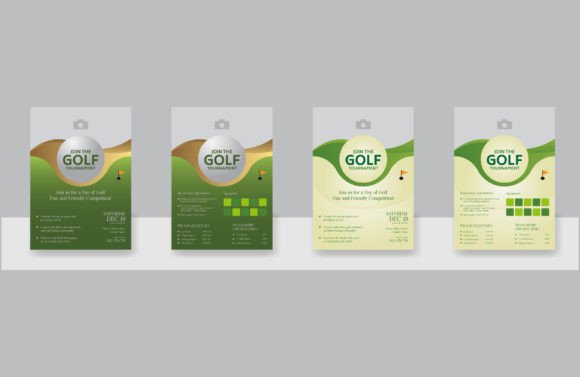
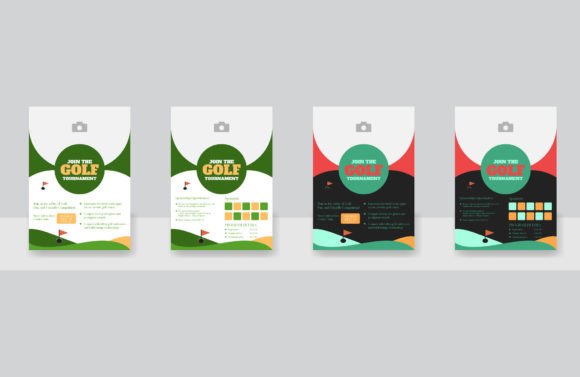
Perhaps the most significant source of disappointment for first-time template users is the assumption that the photography seen in the preview is part of the package. In almost all professional vector templates, the image is not included. The golfer swinging a club, the lush green fairway, or the trophy in the mockup are placeholders intended to demonstrate the layout’s potential.
Failing to account for this leads to two negative outcomes. First, designers often spend hours trying to extract low-resolution watermarked previews from the PDF proof, resulting in pixelated print materials. Second, some users unknowingly violate copyright by using stock photos found via reverse image search without purchasing a license. Before you begin editing, secure high-resolution, properly licensed imagery that matches the lighting and perspective of the template. A well-organized vector template will have a dedicated layer named "Place Image Here" or similar. Use this clipping mask to ensure your replacement photo integrates seamlessly with the existing color grading and composition.
Mastering Layer Organization for Efficient Editing
A major selling point of any reputable Golf Tournament Flyer Template is that it is well organized and easy to edit. However, "easy" is relative to your preparation. Many users dive straight into the canvas, clicking randomly to select elements. This approach risks accidentally moving background shapes, unlocking protected guides, or deleting essential texture overlays.
To avoid this, take five minutes before making any changes to review the Layers panel. Professional templates group elements logically: Backgrounds, Text, Shapes, Effects, and Placeholders are usually separated. Lock the layers you do not intend to modify immediately. This simple corrective step prevents the accidental displacement of complex vector patterns or gradient meshes that are difficult to reconstruct. Furthermore, check for global swatches and character styles. A truly ready-to-use template utilizes global colors, meaning you can update the entire flyer’s color scheme to match your brand by changing a single swatch rather than selecting individual objects one by one.
Typography and Hierarchy Pitfalls
Golf events require clear communication of dates, locations, and entry fees. A common design error occurs when users replace the template’s carefully chosen fonts with system defaults like Arial or Times New Roman because they do not own the original typeface. This destroys the visual hierarchy and makes the flyer look disjointed.
If you do not have the specified fonts, do not simply substitute them. Instead, analyze why the original font was chosen. Was it a serif for tradition? A bold sans-serif for modern impact? Find a comparable alternative that maintains the same weight and x-height. Additionally, ensure you are editing the correct text box. In complex magazine cover vector designs, headlines are sometimes split across multiple text frames for styling purposes. Typing over existing text without checking for overflow or hidden characters can result in missing information on the final print. Always use the Type tool to highlight and replace text rather than deleting the entire text box, which preserves the underlying formatting and alignment guides.
Evaluating Quality Before You Commit
Not all templates labeled "golf flyer" are created equal. Before downloading or purchasing, evaluate the asset against practical usability criteria. A visually stunning preview does not guarantee a functional working file. Check the product description specifically for the phrase ready to use. This implies that the designer has tested the file, ensured all links are embedded or clearly marked, and verified that effects are compatible with standard software versions.
Look for evidence of proper bleed and safe zone setup. Print-ready golf tournament flyers must extend artwork beyond the trim line to prevent white borders after cutting. If a template lacks bleed guides, you will have to manually resize the artboard and stretch backgrounds, increasing the risk of distortion. Similarly, verify the color mode. Digital-only templates are often RGB, while print tournaments require CMYK. Converting between these modes at the last minute can cause vibrant greens to turn muddy or neon accents to dull unexpectedly. Choosing a template that already matches your output medium saves significant correction time later.
Customization Beyond the Surface
Finally, avoid the trap of minimal effort. A template is a starting point, not a finished product. Using a Golf Tournament Flyer Template without adjusting the density of information or the tone of the copy results in generic marketing that fails to connect with your specific audience. If the template features three sponsor slots but you have ten, do not simply shrink the logos until they are illegible. Adapt the grid. Use the vector shapes provided to create additional rows or a dedicated sponsor page.
Likewise, consider the context of your distribution. A flyer designed for a magazine cover vector layout relies on vertical space and central focal points. If you repurpose this for social media without re-composing the elements, critical text may be cropped out by platform interfaces. True efficiency comes from understanding the structural flexibility of the vector file. By respecting the technical constraints and leveraging the organizational features of AI and EPS files, you ensure that your investment yields a professional, effective communication tool that honors the prestige of the game and the importance of your event.